Physical Address
304 North Cardinal St.
Dorchester Center, MA 02124
Physical Address
304 North Cardinal St.
Dorchester Center, MA 02124

MobyTick provides custom TradingView PineScript indicators with real dark pool data. Here's how to get institutional intelligence directly on your TradingView charts.
Update: While TradingView itself doesn’t provide dark pool data, MobyTick does offer custom PineScript indicators that overlay institutional dark pool data directly on your TradingView charts. Here’s the complete comparison and how to get the best of both platforms.
Key Finding: MobyTick bridges the gap by providing custom TradingView scripts with real institutional dark pool data, while TradingView shows public market data (60-70% of trading activity). Together, you get the complete picture.
As of August 2025, MobyTick launched a TradingView Script Generator that creates personalized PineScript indicators with your specific tickers and dark pool data. This revolutionary feature puts institutional-grade intelligence directly on your TradingView charts.
Important note: MobyTick has been working to provide an interactive, real-time indicator directly within TradingView’s platform. However, TradingView has not yet approved this integration, requiring users to manually update their custom scripts with fresh data.
This means you get powerful institutional intelligence on TradingView, but it requires periodic manual updates rather than live streaming data.
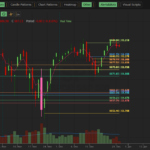
Dark pool price levels provide crucial support and resistance for intraday trading. The attached chart shows SPY at $655.07 (current price as of today), demonstrating how institutional prints create key trading levels that hold throughout the trading session.
Intraday Example: When SPY hit institutional accumulation zones around $634 (as shown in the chart), it created a strong support level. Traders using MobyTick’s dark pool levels could identify these zones before they became obvious on traditional charts.
| Feature | TradingView Only | TradingView + MobyTick | Winner |
|---|---|---|---|
| Chart Tools | ✅ Professional | ✅ Professional | Tie |
| Technical Indicators | ✅ 100+ Built-in | ✅ 100+ Plus Dark Pool | TradingView + MobyTick |
| Public Market Data | ✅ Real-time | ✅ Real-time | Tie |
| Dark Pool Data | ❌ None | ✅ Custom PineScript Overlays | TradingView + MobyTick |
| Institutional Levels | ❌ No | ✅ Support/Resistance from Prints | TradingView + MobyTick |
| Intraday Trading | ⚠️ Limited levels | ✅ Dark Pool Support/Resistance | TradingView + MobyTick |
| Historical Analysis | ✅ Years of price data | ✅ Price + 5+ Years Dark Pool | TradingView + MobyTick |
| Real-time Updates | ✅ Live feeds | ⚠️ Manual script updates | TradingView |
| Community Features | ✅ Large community | ✅ Same community | Tie |
Getting started with MobyTick’s TradingView integration requires a Remora plan or higher subscription. Here’s the step-by-step process:
The SPY chart you provided perfectly illustrates how dark pool levels work in real trading:
Notice how the chart shows multiple support and resistance levels that aren’t just traditional technical levels – they’re enhanced by institutional activity zones. This is where MobyTick’s dark pool data provides the crucial edge for intraday trading.
Most sophisticated traders don’t choose one platform exclusively. Here’s the optimal workflow:
Today’s SPY Setup: MobyTick shows institutional accumulation levels around $653-654. TradingView technical analysis confirms bullish patterns. Combined with today’s bounce from the low at $653.00, traders using both platforms had clear support levels to trade from.
Start with MobyTick’s free demo indicator on TradingView to see how dark pool data appears on charts without any commitment.
Use our free dark pool heatmap to see which stocks have institutional attention right now. No signup required.
Subscribe to MobyTick (Remora plan or higher) to access the Print Lookup feature and generate your own custom TradingView scripts with your specific ticker selections.
MobyTick has been working to provide an interactive, live indicator directly within TradingView’s platform. However, TradingView has not yet approved this integration, requiring users to manually update their custom scripts.
For day trading: daily updates provide the freshest institutional levels. For swing trading: 2-3 times per week is typically sufficient. For position trading: weekly updates work well.
Yes, you can generate different scripts for different timeframes or ticker selections and run them simultaneously on TradingView.
Yes – institutional prints create genuine support and resistance levels because they represent real institutional positioning. The SPY example shows how these levels hold throughout the trading session.
See what TradingView alone can’t show you – institutional positioning data overlaid directly on your favorite charting platform.
While TradingView provides excellent charting tools, MobyTick adds the missing piece: where institutional money is actually flowing. Our custom PineScript indicators bridge this gap, putting dark pool intelligence directly on your TradingView charts.
Ready to enhance your TradingView experience with institutional intelligence?
Start your MobyTick subscription today and get access to the Print Lookup feature that generates custom TradingView indicators with your specific tickers and institutional data.
Want to see the integration in action? Check out our complete TradingView setup guide with step-by-step screenshots and examples.