Physical Address
304 North Cardinal St.
Dorchester Center, MA 02124
Physical Address
304 North Cardinal St.
Dorchester Center, MA 02124
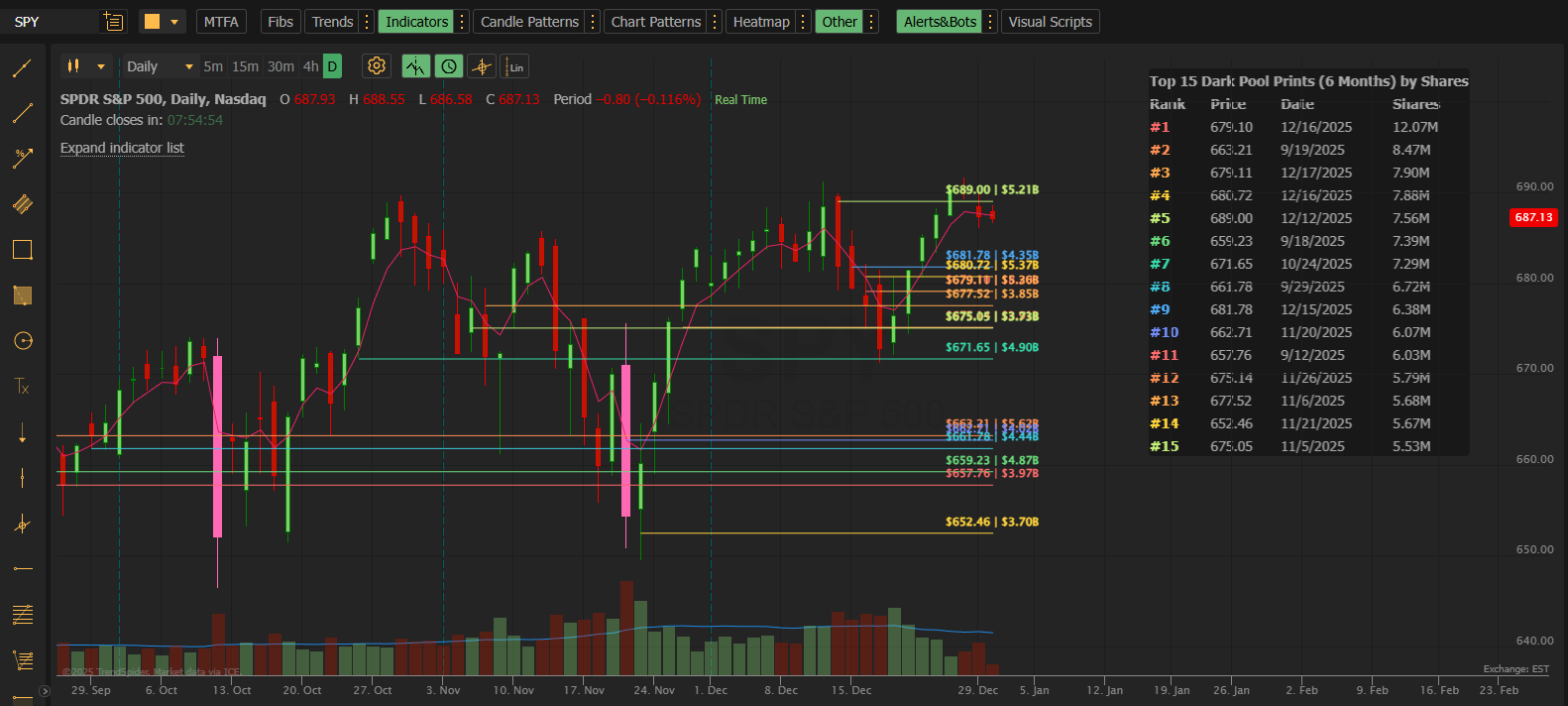
A detailed guide to every configuration option in the MobyTick Dark Pool Levels PRO indicator
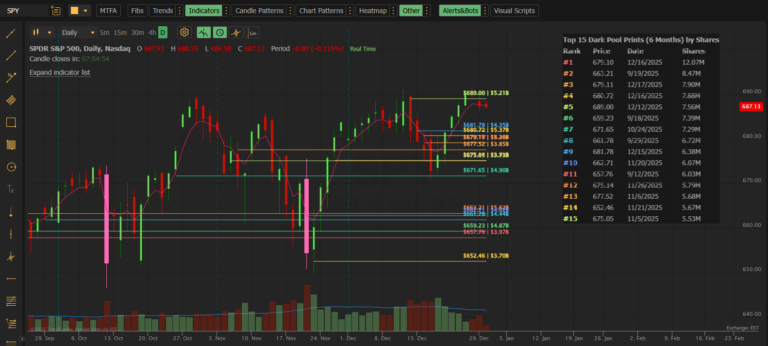
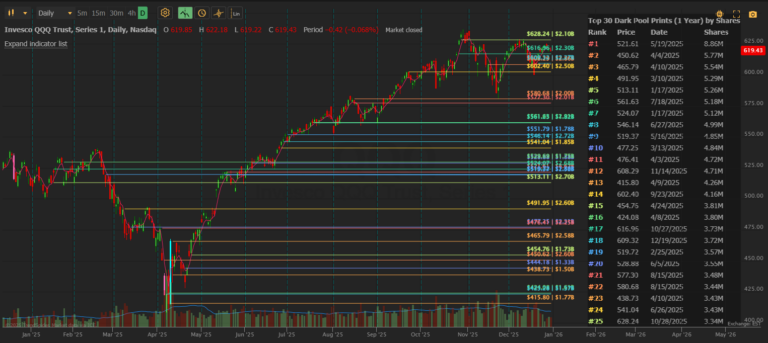
Dark Pool Levels PRO is the advanced version of our institutional dark pool indicator for TrendSpider. PRO unlocks 60-second data refresh, 50 price levels, 5+ years of historical data, and custom date range analysis.
This reference guide explains every setting so you can maximize the power of PRO.
Before diving into settings, here’s what makes PRO different:
| Feature | Standard | PRO |
|---|---|---|
| Data Refresh | 5 minutes | 60 seconds |
| Max Levels | 30 | 50 |
| Lookback Period | 1 year | 5+ years (Jan 2020) |
| Custom End Date | ❌ | ✅ |
| Historical Analysis | ❌ | ✅ |
| Price | $39.95/mo | $59.95/mo |
These settings control the date range and filtering of dark pool data.
Default: 30 Days
Controls how far back to begin searching for dark pool transactions.
| Option | Use Case |
|---|---|
| Today | Intraday only — fresh prints from today’s session |
| Week | Past 7 days of institutional activity |
| 30 Days | Standard swing trading lookback |
| 60 Days | Extended swing analysis |
| 90 Days | Quarterly patterns |
| 6 Months | Medium-term positioning |
| 1 Year | Long-term institutional zones |
| 2 Years | Extended historical analysis |
| 3 Years | Multi-year institutional patterns |
| 4 Years | Near-full historical coverage |
| 5 Years | Maximum lookback (Jan 2020) |
| All | All available data from Jan 1, 2020 |
| Custom | Specific start date using Custom Start field |
Default: Today
Controls where the date range ends. This is a PRO-exclusive feature that enables historical analysis.
| Option | Use Case |
|---|---|
| Today | Current data up to now (most common) |
| Week | End the range 1 week ago |
| 30 Days | End the range 30 days ago |
| 60 Days | End the range 60 days ago |
| 90 Days | End the range 90 days ago |
| 6 Months | End the range 6 months ago |
| 1 Year | End the range 1 year ago |
| 2 Years | End the range 2 years ago |
| 3 Years | End the range 3 years ago |
| 4 Years | End the range 4 years ago |
| 5 Years | End the range 5 years ago |
| All | Same as Today — up to current |
| Custom | Specific end date using Custom End field |
Why Custom End Dates Matter:
| Scenario | Start Date | End Date |
|---|---|---|
| Analyze Q4 2024 only | Oct 1, 2024 | Dec 31, 2024 |
| Study pre-earnings period | 30 days before earnings | Earnings date |
| Research a specific correction | Top of range | Bottom of range |
| COVID crash analysis | Mar 1, 2020 | Mar 23, 2020 |
| Compare two time periods | Run separate analyses | Different end dates |
Default: Rolling based on Start Date Range
When Start Date Range is set to “Custom,” enter your desired start date.
Format: YYYYMMDD (e.g., 20200315 = March 15, 2020)
Range: January 1, 2020 to today
Default: Today’s date
When End Date Range is set to “Custom,” enter your desired end date.
Format: YYYYMMDD (e.g., 20240630 = June 30, 2024)
Range: January 1, 2020 to today
Note: If Custom End is set to a date before Custom Start, the indicator will automatically correct to today’s date.
Default: 30
Range: 1–50 (PRO exclusive: 31–50)
How many price levels to display on the chart. PRO extends the maximum from 30 to 50.
| Setting | Use Case |
|---|---|
| 10–20 | Clean chart, major levels only |
| 25–35 | Balanced view |
| 40–50 | Maximum detail for high-volume stocks |
When to use 40–50 levels:
Default: 50,000
Range: 50,000–100,000,000
Filters out smaller transactions. Only prints with share volume ≥ this value will appear.
| Setting | Use Case |
|---|---|
| 50,000 | See more activity (lower-volume stocks) |
| 100,000 | Standard filter |
| 500,000 | Large institutional trades only |
| 1,000,000+ | Major block trades (high-volume stocks) |
Guidance by Stock Type:
Control the on-chart data table that displays dark pool transaction details.
Default: On (checked)
Toggle the table visibility. When enabled, a table appears on your chart showing details for each displayed level.
Default: Shares (Largest)
Determines the order of rows in the table AND the ranking of lines on the chart.
| Option | Sorts By | Best For |
|---|---|---|
| Shares (Largest) | Total share volume (highest first) | Finding highest-conviction levels |
| Price (Highest) | Price level (highest first) | Viewing levels from resistance down |
| Date (Newest) | Most recent transaction first | Spotting fresh institutional activity |
Default: Standard (Rank, Price, Date, Shares)
Choose which columns appear in the table.
| Preset | Columns Displayed |
|---|---|
| Standard (Rank, Price, Date, Shares) | Rank, Price, Date, Shares |
| Minimal (Rank, Price) | Rank, Price |
| Compact (Rank, Price, Shares) | Rank, Price, Shares |
| Date Focus (Rank, Price, Date) | Rank, Price, Date |
| Value Focus (Rank, Price, Value) | Rank, Price, $ Value |
| Standard + Value | Rank, Price, Date, Shares, Value |
| No Value | Rank, Price, Date, Shares, # Trades |
| Full (All Columns) | All available columns |
| No Rank | Price, Date, Shares, Value, # Trades |
Opens TrendSpider’s standard table editor where you can adjust:
Control the text labels that appear on each horizontal price line.
Default: On (checked)
Toggle label visibility on the price level lines.
Default: Left
Where labels appear on each horizontal line.
| Option | Description |
|---|---|
| Left | Labels at the left edge of the line |
| Right | Labels at the right edge of the line |
Tip: Use “Left” if your chart has price action on the right side; use “Right” if you want labels near current price.
Default: Price + Size
What information to display in each label.
| Format | Example Output |
|---|---|
| Price Only | $685.50 |
| Size Only | 2.5M |
| Date Only | 12/15/2025 |
| Value Only | $1.7B |
| Price + Size | $685.50 | 2.5M |
| Price + Date | $685.50 | 12/15 |
| Price + Value | $685.50 | $1.7B |
| Size + Date | 2.5M | 12/15 |
| Size + Value | 2.5M | $1.7B |
| Date + Value | 12/15 | $1.7B |
| Price + Size + Date | $685.50 | 2.5M | 12/15 |
| Price + Size + Value | $685.50 | 2.5M | $1.7B |
| Price + Date + Value | $685.50 | 12/15 | $1.7B |
| Size + Date + Value | 2.5M | 12/15 | $1.7B |
| All Details | $685.50 | 2.5M | 12/15 | $1.7B |
Each of the 50 possible price levels has its own color swatch. PRO extends this from 30 to 50 lines.
Default: Gradient color scheme (varies by rank)
Looking at the screenshot, PRO uses a rainbow gradient by default:
Click any color swatch to open the color picker and customize that specific line.
Color Strategy Tips:
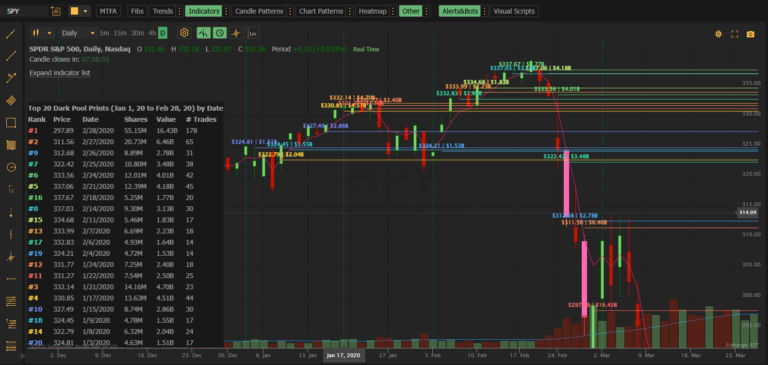
Analyze where institutions bought the March 2020 bottom:
| Setting | Value |
|---|---|
| Start Date Range | Custom |
| Custom Start | 20200301 |
| End Date Range | Custom |
| Custom End | 20200323 |
| Number of Prints | 50 |
| Minimum Share Size | 500,000 |
Study institutional distribution during the 2022 decline:
| Setting | Value |
|---|---|
| Start Date Range | Custom |
| Custom Start | 20220101 |
| End Date Range | Custom |
| Custom End | 20221015 |
| Number of Prints | 50 |
| Minimum Share Size | 1,000,000 |
Catch institutional flow as it happens:
| Setting | Value |
|---|---|
| Start Date Range | Today |
| End Date Range | Today |
| Number of Prints | 30 |
| Minimum Share Size | 100,000 |
| Table Sort By | Date (Newest) |
See institutional positioning 30 days before an earnings report:
| Setting | Value |
|---|---|
| Start Date Range | 30 Days |
| End Date Range | Custom |
| Custom End | Day before earnings (YYYYMMDD) |
| Number of Prints | 40 |
| Minimum Share Size | 200,000 |
Period 1 (Before Fed Meeting):
Period 2 (After Fed Meeting):
Compare the prints to see how institutional behavior changed around the event.
| Setting | Value |
|---|---|
| Start Date Range | Today |
| End Date Range | Today |
| Number of Prints | 25–35 |
| Minimum Share Size | 100,000+ |
| Table Sort By | Date (Newest) |
| Label Format | Price + Size |
| Setting | Value |
|---|---|
| Start Date Range | 60 Days |
| End Date Range | Today |
| Number of Prints | 40–50 |
| Minimum Share Size | 100,000–200,000 |
| Table Sort By | Shares (Largest) |
| Label Format | Price + Size + Date |
| Setting | Value |
|---|---|
| Start Date Range | 1 Year or longer |
| End Date Range | Today |
| Number of Prints | 50 |
| Minimum Share Size | 500,000+ |
| Table Sort By | Shares (Largest) |
| Label Format | All Details |
| Setting | Value |
|---|---|
| Start Date Range | Custom |
| End Date Range | Custom |
| Number of Prints | 50 |
| Minimum Share Size | Varies |
| Table Columns | Full (All Columns) |
| Label Format | All Details |
Dark Pool Levels PRO by MobyTick Trading — 50 levels. 6 years of history. The complete institutional edge.